Backcountry Pilot • How to ignore a user's posts

How to ignore a user's posts

Look in here for step-by-step procedures on how to upload photos to the gallery, embed images in posts, and use other fun features of this website.
2 postsPage 1 of 1

How to ignore a user's posts

It occurred to me that when I get too bossy or wordy or full of shit, some of you might want to have my posts hidden for a better BCP experience in general. Here's how:

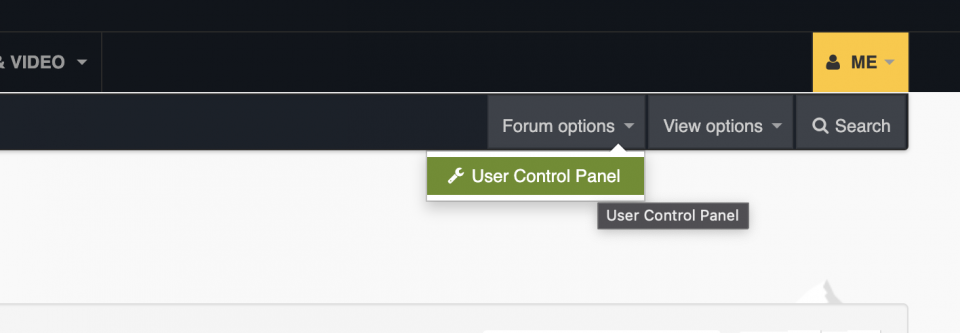
While in the forum, click "Forum options" and a second menu will appear below it called "User Control Panel." This is just for the forum.
Image

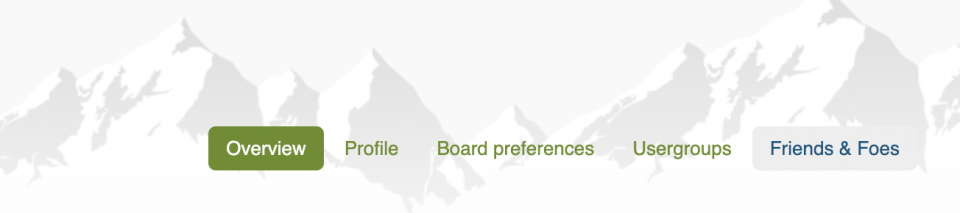
In the horizontal menu above the main area, click "Friends and Foes."
Image

Now, in the left sidebar menu, choose "Manage Foes."
Image

You'll be taken to a screen where you can add the username of the user whose posts you don't want to see in threads. Example: "Zzz" Copy/paste from another screen or use the "Find member" feature (which is kinda ugly.)
Image

Click "Submit" and that's all there is to it. Posts from those users in the list won't appear, though quotes of their posts will appear in other users' posts.

Use the same screen to remove a user from your shit list by selecting their username in the list, and clicking "Submit."

Accordingly, defining "Friends" in the forum is a pretty worthless feature.
Zzz offline
Janitorial Staff
User avatar
Posts: 2854
Joined: Fri Oct 08, 2004 11:09 pm
Location: northern
Aircraft: Swiveling desk chair
Half a century spent proving “it is better to be thought a fool than to open your mouth and remove all doubt.”

Re: How to ignore a user's posts

It works well, if you're logged in.
Zzz offline
Janitorial Staff
User avatar
Posts: 2854
Joined: Fri Oct 08, 2004 11:09 pm
Location: northern
Aircraft: Swiveling desk chair
Half a century spent proving “it is better to be thought a fool than to open your mouth and remove all doubt.”

DISPLAY OPTIONS

2 postsPage 1 of 1

Who is online

Users browsing this forum: No registered users and 0 guests

Latest Features

Latest Knowledge Base
