I'm going to try the Blurfix, no joy in the local photo shops so online we go.
Got a GoPro 3 weeks ago and installed a bracket on left wing tie down ring and an cockpit inside tube mount.
Got both a Ram set up and GoPro clamp mounts.
If we get out of the deep freeze out here I can try it out. Batteries don't last long in cold temps.
Good to have an unbiased review.
Thanks
How to shoot flying video
Thu Jan 30, 2014 7:14 am
- Beamer pilot offline
- Posts: 107
- Joined: Sun Nov 06, 2011 9:47 am
- Location: Bluffton AB
Thu Jan 30, 2014 8:42 am
Re: How to shoot flying video
Zane, Thanks for this topic. I need this help 
I have the Hero3. I pretty much always mount the camera outside which is certainly fun but watching the video you used in this topic where we can see you working the flaps, throttle, etc was very interesting. Prop distortion has always been a problem. I'll be ordering a filter as you described. I went out to the hangar yesterday moved the mounting to the overhead tubes in the ceiling behind the front seats. Easy peasy.
The GoPro seems to be about the most popular action cams out there so I'm gonna throw something out and see what all of you have to say: I've never been happy with my camera. The wi-fi has always been unpredictable. I mount the camera way out under the wing, turn on the wifi. Aim the camera with the iphone or ipad app. Maybe shoot video on take off; then turn the camera off. It may allow me to turn it on and off another time or two but invariably, at some point, I will try to turn it on or off and the camera can no longer be controlled. The camera shows up on my networks but the app with say "no camera detected" until I manually turn all of the features off and back on directly from the camera.
Second thing (everyones complaint): short battery life. Especially if the wi-fi is on (as Zane already stated). My camera may also have a charging problem (I must sound a little crazy at this point because I seem to have way to many problems to be the camera's fault right). I have the backpak battery also (i should have mentioned that earlier). Sometimes I can plug my camera in to charge (using 2amp USB wall adapter) and will still not show fully charged after a couple of days. Other times it may be ready over night. Then when fully charged, if I leave it unplugged for a week it is dead.
Are these thing normal? Am I an idiot? Am I doing things wrong?
My current intended solution is to run a USB cable inside my headliner up to when the camera is mounted and just be able to power it in flight. I tested that here in my office yesterday to make sure it would work. The camera ran until the card was full (4.5hrs) with the wi-fi on and then, when completely shut off, returned to fully charged status in an hour or so. I will say that the wi-fi connectivity did fail during that time.
Thanks,
High-maintenance-camera-nubie
Jeff
I have the Hero3. I pretty much always mount the camera outside which is certainly fun but watching the video you used in this topic where we can see you working the flaps, throttle, etc was very interesting. Prop distortion has always been a problem. I'll be ordering a filter as you described. I went out to the hangar yesterday moved the mounting to the overhead tubes in the ceiling behind the front seats. Easy peasy.
The GoPro seems to be about the most popular action cams out there so I'm gonna throw something out and see what all of you have to say: I've never been happy with my camera. The wi-fi has always been unpredictable. I mount the camera way out under the wing, turn on the wifi. Aim the camera with the iphone or ipad app. Maybe shoot video on take off; then turn the camera off. It may allow me to turn it on and off another time or two but invariably, at some point, I will try to turn it on or off and the camera can no longer be controlled. The camera shows up on my networks but the app with say "no camera detected" until I manually turn all of the features off and back on directly from the camera.
Second thing (everyones complaint): short battery life. Especially if the wi-fi is on (as Zane already stated). My camera may also have a charging problem (I must sound a little crazy at this point because I seem to have way to many problems to be the camera's fault right). I have the backpak battery also (i should have mentioned that earlier). Sometimes I can plug my camera in to charge (using 2amp USB wall adapter) and will still not show fully charged after a couple of days. Other times it may be ready over night. Then when fully charged, if I leave it unplugged for a week it is dead.
Are these thing normal? Am I an idiot? Am I doing things wrong?
My current intended solution is to run a USB cable inside my headliner up to when the camera is mounted and just be able to power it in flight. I tested that here in my office yesterday to make sure it would work. The camera ran until the card was full (4.5hrs) with the wi-fi on and then, when completely shut off, returned to fully charged status in an hour or so. I will say that the wi-fi connectivity did fail during that time.
Thanks,
High-maintenance-camera-nubie
Jeff
- Alpina23 offline
- Posts: 83
- Joined: Wed Feb 20, 2013 7:46 am
- Location: Grays Harbor
- FindMeSpot URL: http://share.findmespot.com/shared/face ... xE66krEPHB
- Aircraft: 1953 C170B
1947 Stinson Voyager
Thu Jan 30, 2014 11:02 am
Re: How to shoot flying video
I received my possible fix for poor battery life yesterday.
http://www.aircraftspruce.ca/catalog/el ... -12101.php
No time to install or test the theory so far.
http://www.aircraftspruce.ca/catalog/el ... -12101.php
No time to install or test the theory so far.
- Beamer pilot offline
- Posts: 107
- Joined: Sun Nov 06, 2011 9:47 am
- Location: Bluffton AB
Fri Jan 31, 2014 8:35 am
Re: How to shoot flying video
Alpina23 wrote:The GoPro seems to be about the most popular action cams out there so I'm gonna throw something out and see what all of you have to say: I've never been happy with my camera. The wi-fi has always been unpredictable. I mount the camera way out under the wing, turn on the wifi. Aim the camera with the iphone or ipad app. Maybe shoot video on take off; then turn the camera off. It may allow me to turn it on and off another time or two but invariably, at some point, I will try to turn it on or off and the camera can no longer be controlled. The camera shows up on my networks but the app with say "no camera detected" until I manually turn all of the features off and back on directly from the camera.
The wifi module has been the worst part of the software stack for a long time. Empirically, I've found things to work *much* better using the keychain remote instead of the IOS app. So I tend to use IOS for initial aiming sometimes, though usually even that I typically use the LCD backpack these days, and then the keychain. Very few troubles with that approach.
Make sure you have the July firmware. That was the first one that had a useable wifi module (IMO).
Alpina23 wrote:Second thing (everyones complaint): short battery life. Especially if the wi-fi is on (as Zane already stated). My camera may also have a charging problem (I must sound a little crazy at this point because I seem to have way to many problems to be the camera's fault right). I have the backpak battery also (i should have mentioned that earlier). Sometimes I can plug my camera in to charge (using 2amp USB wall adapter) and will still not show fully charged after a couple of days. Other times it may be ready over night. Then when fully charged, if I leave it unplugged for a week it is dead.
I haven't had the unplugged problem, so maybe you really do have a battery issue. The only other thing I can think of is that some 2amp chargers actually have multiple ports and not all of them are high power. If yours has multiple ports, just double check to make sure you are using the one that spits out the juice.
- rw2 offline

- Posts: 1799
- Joined: Sat Dec 22, 2012 1:10 pm
- Location: San Miguel de Allende
- FindMeSpot URL: https://share.delorme.com/LaNaranjaDanzante
- Aircraft: Experimental Maule
Follow my Flying, Cooking and Camping adventures at RichWellner.com
Fri Jan 31, 2014 4:22 pm
Re: How to shoot flying video
Hello All,
I read through the thread and wanted to let you know about a mount I designed to attach a camera to a wingstrut. I have a version for all the strutted Cessnas from 140a through the strutted 210. It also works on the Stinson 108 series as well as a few experimentals using similar sized struts. I also have a version in testing that works with all 3 Bearhawks, most pipers, all of the strutted Rans, Zenair CH series as well as any experimental using Carlson aircraft struts.
I have attached a link to my youtube page as well as a few other videos. Allen uses my mount in his AOTF tv show and one of his videos is on my page.
My Page: http://www.youtube.com/channel/UCPkbgRO81PVUeH7GGwV_4JA
Video from Cubcrafters of their Carbon Cub using my mount: http://www.youtube.com/watch?v=daAFtYrfL_M
Cessna 185 in AK: http://www.backcountrypilot.org/forum/g ... mple-14210
Anyone interested in a mount feel free to PM me...
Best regards,
Marc Webster
I read through the thread and wanted to let you know about a mount I designed to attach a camera to a wingstrut. I have a version for all the strutted Cessnas from 140a through the strutted 210. It also works on the Stinson 108 series as well as a few experimentals using similar sized struts. I also have a version in testing that works with all 3 Bearhawks, most pipers, all of the strutted Rans, Zenair CH series as well as any experimental using Carlson aircraft struts.
I have attached a link to my youtube page as well as a few other videos. Allen uses my mount in his AOTF tv show and one of his videos is on my page.
My Page: http://www.youtube.com/channel/UCPkbgRO81PVUeH7GGwV_4JA
Video from Cubcrafters of their Carbon Cub using my mount: http://www.youtube.com/watch?v=daAFtYrfL_M
Cessna 185 in AK: http://www.backcountrypilot.org/forum/g ... mple-14210
Anyone interested in a mount feel free to PM me...
Best regards,
Marc Webster
- Addicted2climbing offline
- Posts: 175
- Joined: Wed Apr 03, 2013 12:07 am
- Location: Glendale, Ca
Fri Jan 31, 2014 7:33 pm
Re: How to shoot flying video
Addicted2climbing wrote:Hello All,
I read through the thread and wanted to let you know about a mount I designed to attach a camera to a wingstrut. I have a version for all the strutted Cessnas from 140a through the strutted 210. It also works on the Stinson 108 series as well as a few experimentals using similar sized struts. I also have a version in testing that works with all 3 Bearhawks, most pipers, all of the strutted Rans, Zenair CH series as well as any experimental using Carlson aircraft struts.
I have attached a link to my youtube page as well as a few other videos. Allen uses my mount in his AOTF tv show and one of his videos is on my page.
My Page: http://www.youtube.com/channel/UCPkbgRO81PVUeH7GGwV_4JA
Video from Cubcrafters of their Carbon Cub using my mount: http://www.youtube.com/watch?v=daAFtYrfL_M
Cessna 185 in AK: http://www.backcountrypilot.org/forum/g ... mple-14210
Anyone interested in a mount feel free to PM me...
Best regards,
Marc Webster
And I'll be trying out the Rans strut prototype.
 Can't wait.
Sat Feb 01, 2014 8:58 am
How to shoot flying video
Here's another mounting idea. I used my Nflight cam (aka Contour with prop filter) to shoot this video. I used their adjustable rotating mount and some fresh 3M double sided tape to mount the mount to the ear cup. The Nflight cam has an adjustable, rotating lens so mounting is very flexible. It really gives an eye level perspective. I had tried mounting on the headband once and like many other action cameras, the wide angle lens caught more of the roof of the cabin than action out the window, plus I kept hitting the camera on the roof. I am very happy with the results from the ear cup.
I shot the video Jan 29th in some super smooth winter air. It was cold, not as cold as it has been, but cold enough. I am basically just burning holes in the sky to burn off hours so I can take my checkride. Plus, I am still waiting for parts for my airplane. I can't wait to fly it!!!!
I got a little scare on short final at the end. Made my heart rate go up a bit. I thought of mauleguy when his ratchet broke in his airplane, but this was my fault, not the airplane. I think?
I shot the video Jan 29th in some super smooth winter air. It was cold, not as cold as it has been, but cold enough. I am basically just burning holes in the sky to burn off hours so I can take my checkride. Plus, I am still waiting for parts for my airplane.
I can't wait to fly it!!!! I got a little scare on short final at the end. Made my heart rate go up a bit. I thought of mauleguy when his ratchet broke in his airplane, but this was my fault, not the airplane. I think?
- Crzyivan13 offline
- Posts: 1811
- Joined: Sat Nov 24, 2012 9:50 pm
- Location: Ohio- OI27 Checkpoint Charlie
- FindMeSpot URL: https://share.delorme.com/EvanDavis
- Aircraft: 1957 Cessna 182A
Sat Feb 01, 2014 6:21 pm
Re: How to shoot flying video
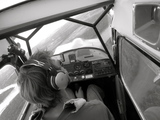
Anyone want to supply a critique? This is my first attempt at mounting the GoPro in the cockpit. Other than being a perfect location to document the progress of my bald spot, what do you guys think of this location? Suggestions?
Also, the WiFi and controlling with my phone works awesome. Love it!
Also, the WiFi and controlling with my phone works awesome. Love it!
Sat Feb 01, 2014 7:08 pm
How to shoot flying video
Scott- That was fun. The vantage point is great but I would switch the video aspect ratio to 16:9, and get yourself a neutral density filter to totally blur out the prop.

Sat Feb 01, 2014 7:30 pm
Re: How to shoot flying video
Zzz wrote:Scott- That was fun. The vantage point is great but I would switch the video aspect ratio to 16:9, and get yourself a neutral density filter to totally blur out the prop.
The filter is on order.
I didn't do any adjustments to the camera. Just pulled it out of the box, charged it and mounted it. When I got home I changed the video setting.I'll also be wearing a hat next time.

Sat Feb 01, 2014 7:42 pm
How to shoot flying video
Scott, I like the mounting location too. I've always been a fan of showing controls as well as what's happening outside the plane in relation.
- Crzyivan13 offline
- Posts: 1811
- Joined: Sat Nov 24, 2012 9:50 pm
- Location: Ohio- OI27 Checkpoint Charlie
- FindMeSpot URL: https://share.delorme.com/EvanDavis
- Aircraft: 1957 Cessna 182A
Mon Feb 03, 2014 12:26 pm
Re: How to shoot flying video
I like how S12Flyer does his too. Mounted on the strut so that you can see what's ahead of the plane and still see what the pilot is doing. I'll try that when my strut mount shows up.
I finally figured out how to change the settings on the camera. Next week I'm going to try to get a little bit more out the "of the cockpit view" and still retain the panel and controls in the shot.
I finally figured out how to change the settings on the camera. Next week I'm going to try to get a little bit more out the "of the cockpit view" and still retain the panel and controls in the shot.
Mon Feb 03, 2014 4:27 pm
Re: How to shoot flying video
On several of my recent video you can see the difference between the GoPro 3 and the Drift HD170 Stealth.
All in all I much prefer the Drift to the GoPro. But that is a subject for another thread.
Someday I'll invest in a couple of filters. Probable the same "someday" I go on a diet and begin my exercise regime.
My wing strut mount is stupidly simple. Some zip ties, some high density foam and the goggle strap mount that came with my drift. Fast, easy to move, and fits any shaped strut (except round). My external GoPro mounts require much more extreme measures. The Gopro has a much larger wind profile. The only stick on 3m mount that I use is on my tailwheel strut. But I still used a short safety leash on that one. I have to use the wifi remote for that mounting so I don't use it much except for short flights. The battery life leaves a lot to be desired with the wifi running.
There has been an explosion of available mounts for "adventure" cameras so it's usually fairly easy to adapt something to nearly any part of your plane. My most recent mount is one I found on the big auction site that has a very adjustable quick clamp and a highly adjustable 1/4 x 20 standard camera mount. It pretty much will camp on any of the tubing in my cockpit. And it works with both cameras. (with the obligatory go pro adapter, of course)
What I would really like is a WiFi app to hook up to my intercom / radio. I've got enough wires, don't need a mic wire too.
My Rotax is so quiet that the only sound that ends up on my outside shots is wind noise. Not the deep throaty rumble of the Lyc's and the Conti's. So that's why most of mine have a musical sound track.
All in all I much prefer the Drift to the GoPro. But that is a subject for another thread.
Someday I'll invest in a couple of filters. Probable the same "someday" I go on a diet and begin my exercise regime.
My wing strut mount is stupidly simple. Some zip ties, some high density foam and the goggle strap mount that came with my drift. Fast, easy to move, and fits any shaped strut (except round). My external GoPro mounts require much more extreme measures. The Gopro has a much larger wind profile. The only stick on 3m mount that I use is on my tailwheel strut. But I still used a short safety leash on that one. I have to use the wifi remote for that mounting so I don't use it much except for short flights. The battery life leaves a lot to be desired with the wifi running.
There has been an explosion of available mounts for "adventure" cameras so it's usually fairly easy to adapt something to nearly any part of your plane. My most recent mount is one I found on the big auction site that has a very adjustable quick clamp and a highly adjustable 1/4 x 20 standard camera mount. It pretty much will camp on any of the tubing in my cockpit. And it works with both cameras. (with the obligatory go pro adapter, of course)
What I would really like is a WiFi app to hook up to my intercom / radio. I've got enough wires, don't need a mic wire too.
My Rotax is so quiet that the only sound that ends up on my outside shots is wind noise. Not the deep throaty rumble of the Lyc's and the Conti's. So that's why most of mine have a musical sound track.
"In a world full of people, only a few want to fly"
Mon Feb 03, 2014 4:48 pm
Re: How to shoot flying video
svanarts wrote:Zzz wrote:Scott- That was fun. The vantage point is great but I would switch the video aspect ratio to 16:9, and get yourself a neutral density filter to totally blur out the prop.
The filter is on order.
I'll also be wearing a hat next time.
Hey Scott,
I received the parts I was waiting on today and will be building up some mounts throughout this week. I should have the Rans Mount ready for you in a few days.
Take care,
Marc
Cloudbase Engineering LLC
- Addicted2climbing offline
- Posts: 175
- Joined: Wed Apr 03, 2013 12:07 am
- Location: Glendale, Ca
Mon Feb 03, 2014 5:38 pm
Re: How to shoot flying video
Zane,
Received my circular polarizer today. Its a polar pro glass edition.
Unfortunately, it fits a Hero3+, not a Hero3.
I didn't even know there was a Hero3+. I do now.
Anybody have a Hero 3+ and would like to buy the circular polarizer?
I'd rather sell it to one of you at half price than return it.
Now awaiting the polarizer set up you recommended in your article. One day I will listen.
Received my circular polarizer today. Its a polar pro glass edition.
Unfortunately, it fits a Hero3+, not a Hero3.
I didn't even know there was a Hero3+. I do now.
Anybody have a Hero 3+ and would like to buy the circular polarizer?
I'd rather sell it to one of you at half price than return it.
Now awaiting the polarizer set up you recommended in your article. One day I will listen.
Mon Feb 03, 2014 5:45 pm
Re: How to shoot flying video
I have a 3+ that id like to get a filter for...

Mon Feb 03, 2014 5:49 pm
Re: How to shoot flying video
Idahomike wrote:Unfortunately, it fits a Hero3+, not a Hero3.
Mike, I'm sorry for that. I didn't know they were incompatible either. I'll make the note in the article about that to hopefully prevent others from making the same mixup.
Mon Feb 03, 2014 5:50 pm
Re: How to shoot flying video
If A1Skinner doesn't take I'll buy it.
- Beamer pilot offline
- Posts: 107
- Joined: Sun Nov 06, 2011 9:47 am
- Location: Bluffton AB
Mon Feb 03, 2014 6:33 pm
Re: How to shoot flying video
A1 Skinner..... PM me your address and I'll pop it in the mail.
How about 20 bucks... I'll pay shipping.
Mike
How about 20 bucks... I'll pay shipping.
Mike
DISPLAY OPTIONS
Who is online
Users browsing this forum: No registered users and 0 guests
Latest Features
-
-
Featured Bush Planes
As one of the undisputed legends of bush flying, the Cessna 180 hauls a…Read More -
Aircraft Ownership and Maintenance
9 modification mistakes aircraft owners make when trying to "bush out" their birds—why some…Read More -
Live to Tell
A Minnesota pilot is surprised to learn that the sudden asymmetric drag of an…Read More




Latest Knowledge Base
-
Destinations
Canada offers some of the most spectacular backcountry flying on the continent. Here's what you need to know before you go.Read More -
Safety and Survival
Hope that you never have to use your survival vest but knowing you have it and knowing how to use…Read More -
Destinations
A regional guide with ideas for winter camping destinations in California, Nevada, New Mexico, and Arizona.Read More -
Aircraft
Finding an affordable aircraft that can handle the backcountry for $80K or less? A challenge for sure, but with the…Read More



