Wonder if any of the tech wizards could help me with this one.
I have a new iPad mini cellular and a iPhone 13
I only got the cellular iPad for the GPS chip, however I have a option for a “esim” on the iPhone, question is could I do the esim on the iPhone and put the physical sim into the iPad, never use them both at the same time, but just in case the phone dies, get lost, etc I could still get a text out or something from the iPad?
iPad sim card question
Fri Aug 05, 2022 1:56 pm
iPad sim card question
Last edited by NineThreeKilo on Sun Aug 07, 2022 4:48 pm, edited 1 time in total.
- NineThreeKilo offline
- Retired
- Posts: 1679
- Joined: Thu Dec 31, 2009 8:16 pm
- Location: _
Fri Aug 05, 2022 2:13 pm
Re: iPad sim car question
I imagine you could swap the physical SIM between devices no problem. I don't know if the SIM intended for the iPad has a phone number associated with it though. Seems like they're just geared as a network node for data only.
FWIW I have several iPads and always get the wifi-only model. I finally got back in the air recently and wanted to use Garmin Pilot so I ordered a $99 Garmin GLO 2 bluetooth GPS module which I can use with my phone or iPad.
FWIW I have several iPads and always get the wifi-only model. I finally got back in the air recently and wanted to use Garmin Pilot so I ordered a $99 Garmin GLO 2 bluetooth GPS module which I can use with my phone or iPad.
- Zzz offline


- Posts: 2854
- Joined: Fri Oct 08, 2004 11:09 pm
- Location: northern
- Aircraft: Swiveling desk chair
Half a century spent proving “it is better to be thought a fool than to open your mouth and remove all doubt.”
Fri Aug 05, 2022 6:39 pm
Re: iPad sim car question
I'm no expert, having only caved to the iPad crowd two weeks ago. I quickly discovered that my Verizon phone is a paper weight in Alaska. The most common carrier up there is GCI, which is what the locals use in all the villages I fly to for my job.*
At the same time I realized I would need a GCI phone number I got my first real world exposure to Foreflight. I have known it was a very good application for a long time but I scratched Apple products off my list years ago. But my exposure to Foreflight over a few days convinced me to buy an iPad mini with the data plan. For those who don't know, the wifi version of the iPad does not have an internal GPS. Foreflight will function pretty well with the iPad in this way and does not require an external GPS.**
To answer one of the questions, yes your ipad with dataplan does have a phone number associated with it. And yes, you should be able to take the physical SIM out of the iPad and install it in your phone.
One of my new coworkers had told me I should be able to make my recently acquired Pixel 6 phone into a dual SIM phone by using one hard SIM and an eSIM. The woman at the GCI store strongly suggested that I go back home and have Verizon set my Pixel up as an eSIM phone and then I could install the hard SIM from the iPad into the Pixel and have my dual SIM configuration. She told me it wouldn't work as well doing it the other way (GCI eSIM) but I didn't spend enough synapses locking in why that was.
She also told me that Verizon has recently changed their policy and will unlock a phone after 90 days rather than requiring it be paid off, as in years past.
*A phone is nice in cases where I have 1000 lbs of Hot Pockets and soda in the 207 but no agent to pick them up, and I have two moms with toddlers standing by the plane who need to get to Bethel. Messaging through my Inreach or SpiderTracks has proven to be not very effective.
**I have since ordered the uAvionix Sentry which provides me ADS-B in, closer to real time weather and AHRS (but don't get me started on my opinion of that function). Still, batteries crap out and having the iPad capable of providing GPS position seems like a better solution.
At the same time I realized I would need a GCI phone number I got my first real world exposure to Foreflight. I have known it was a very good application for a long time but I scratched Apple products off my list years ago. But my exposure to Foreflight over a few days convinced me to buy an iPad mini with the data plan. For those who don't know, the wifi version of the iPad does not have an internal GPS. Foreflight will function pretty well with the iPad in this way and does not require an external GPS.**
To answer one of the questions, yes your ipad with dataplan does have a phone number associated with it. And yes, you should be able to take the physical SIM out of the iPad and install it in your phone.
One of my new coworkers had told me I should be able to make my recently acquired Pixel 6 phone into a dual SIM phone by using one hard SIM and an eSIM. The woman at the GCI store strongly suggested that I go back home and have Verizon set my Pixel up as an eSIM phone and then I could install the hard SIM from the iPad into the Pixel and have my dual SIM configuration. She told me it wouldn't work as well doing it the other way (GCI eSIM) but I didn't spend enough synapses locking in why that was.
She also told me that Verizon has recently changed their policy and will unlock a phone after 90 days rather than requiring it be paid off, as in years past.
*A phone is nice in cases where I have 1000 lbs of Hot Pockets and soda in the 207 but no agent to pick them up, and I have two moms with toddlers standing by the plane who need to get to Bethel. Messaging through my Inreach or SpiderTracks has proven to be not very effective.
**I have since ordered the uAvionix Sentry which provides me ADS-B in, closer to real time weather and AHRS (but don't get me started on my opinion of that function). Still, batteries crap out and having the iPad capable of providing GPS position seems like a better solution.

Sat Aug 06, 2022 8:29 am
Re: iPad sim car question
aftCG wrote:I'm no expert, having only caved to the iPad crowd two weeks ago. I quickly discovered that my Verizon phone is a paper weight in Alaska. The most common carrier up there is GCI, which is what the locals use in all the villages I fly to for my job.*
At the same time I realized I would need a GCI phone number I got my first real world exposure to Foreflight. I have known it was a very good application for a long time but I scratched Apple products off my list years ago. But my exposure to Foreflight over a few days convinced me to buy an iPad mini with the data plan. For those who don't know, the wifi version of the iPad does not have an internal GPS. Foreflight will function pretty well with the iPad in this way and does not require an external GPS.**
To answer one of the questions, yes your ipad with dataplan does have a phone number associated with it. And yes, you should be able to take the physical SIM out of the iPad and install it in your phone.
One of my new coworkers had told me I should be able to make my recently acquired Pixel 6 phone into a dual SIM phone by using one hard SIM and an eSIM. The woman at the GCI store strongly suggested that I go back home and have Verizon set my Pixel up as an eSIM phone and then I could install the hard SIM from the iPad into the Pixel and have my dual SIM configuration. She told me it wouldn't work as well doing it the other way (GCI eSIM) but I didn't spend enough synapses locking in why that was.
She also told me that Verizon has recently changed their policy and will unlock a phone after 90 days rather than requiring it be paid off, as in years past.
*A phone is nice in cases where I have 1000 lbs of Hot Pockets and soda in the 207 but no agent to pick them up, and I have two moms with toddlers standing by the plane who need to get to Bethel. Messaging through my Inreach or SpiderTracks has proven to be not very effective.
**I have since ordered the uAvionix Sentry which provides me ADS-B in, closer to real time weather and AHRS (but don't get me started on my opinion of that function). Still, batteries crap out and having the iPad capable of providing GPS position seems like a better solution.
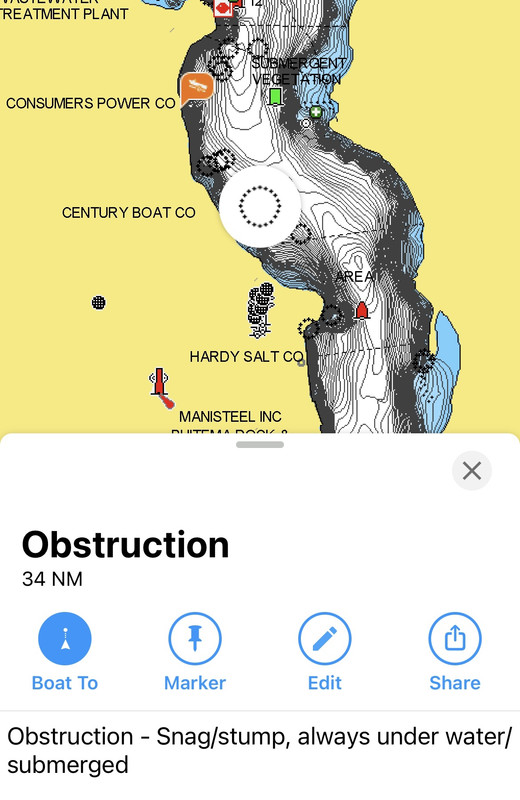
I’ve been a big fan of iPhones since my 3, and the iPad mini and foreflight is awesome for float planes (especially combined with navionics for crowd sourced bathetric data, or with a sounder you can chart a lake yourself from a jon boat) all the way to burning jet a at FL300,
I wonder why the esim on the iPad work with putting the actual sim in the phone, but not the other way around?
- NineThreeKilo offline
- Retired
- Posts: 1679
- Joined: Thu Dec 31, 2009 8:16 pm
- Location: _
Sat Aug 06, 2022 4:08 pm
Re: iPad sim car question
Was an early adopter of the iPhone (3G) and had them through the 6. Then I got a Google Pixel in 2016 and it was the best phone I had ever had at that point. Currently on a OnePlus 7T Pro 5G but I recently returned to using iPads because I think they have the tablet market cornered, which makes me think I'll be going to the iPhone 14 when it's released.
I try to be agnostic for the most part, but with tablets there's no contest.
I try to be agnostic for the most part, but with tablets there's no contest.
- Zzz offline
- Posts: 2854
- Joined: Fri Oct 08, 2004 11:09 pm
- Location: northern
- Aircraft: Swiveling desk chair
Half a century spent proving “it is better to be thought a fool than to open your mouth and remove all doubt.”
Sat Aug 06, 2022 11:02 pm
Re: iPad sim car question
Sorry I can’t answer original question but on AT&T it is a $10 flat monthly fee to add a cellular equipped iPad to your phone plan. Very convenient in situations as you describe or getting ForeFlight info when wifi not available or while flying.
AftCG, whatever you do, DO NOT port over your permanent number to GCI. They are the only carrier on earth that won’t give it back to you when you leave. GCI fastphone prepaid ($35/month) on a cheap second phone works well, did that for 4 years. A dual sim would work too but I’ve never used one.
AftCG, whatever you do, DO NOT port over your permanent number to GCI. They are the only carrier on earth that won’t give it back to you when you leave. GCI fastphone prepaid ($35/month) on a cheap second phone works well, did that for 4 years. A dual sim would work too but I’ve never used one.


Sun Aug 07, 2022 2:12 pm
Re: iPad sim car question
asa wrote:Sorry I can’t answer original question but on AT&T it is a $10 flat monthly fee to add a cellular equipped iPad to your phone plan. Very convenient in situations as you describe or getting ForeFlight info when wifi not available or while flying.
AftCG, whatever you do, DO NOT port over your permanent number to GCI. They are the only carrier on earth that won’t give it back to you when you leave. GCI fastphone prepaid ($35/month) on a cheap second phone works well, did that for 4 years. A dual sim would work too but I’ve never used one.
Thanks for the heads up about GCI. My plan, if possible, was to simply turn my Pixel 6 into a dual SIM phone, retaining my very old 206 phone number with Verizon as an eSIM, and then using my GCI (yes, cheapo prepaid plan) hard sim to allow me to answer/call from my 907 phone number when I'm on the job in Alaska.
Not even sure if it's possible. Way back in the mid 2000's I had a phone (Razor?) which had two SIM slots. When my employer issued me a cell phone I was annoyed at the idea of bringing two cell phones everywhere with me, so I pulled the SIM out of the work phone and installed it in my Razor. I recall it working just fine.
Sun Aug 07, 2022 3:38 pm
Re: iPad sim car question
aftCG wrote:asa wrote:Sorry I can’t answer original question but on AT&T it is a $10 flat monthly fee to add a cellular equipped iPad to your phone plan. Very convenient in situations as you describe or getting ForeFlight info when wifi not available or while flying.
AftCG, whatever you do, DO NOT port over your permanent number to GCI. They are the only carrier on earth that won’t give it back to you when you leave. GCI fastphone prepaid ($35/month) on a cheap second phone works well, did that for 4 years. A dual sim would work too but I’ve never used one.
Thanks for the heads up about GCI. My plan, if possible, was to simply turn my Pixel 6 into a dual SIM phone, retaining my very old 206 phone number with Verizon as an eSIM, and then using my GCI (yes, cheapo prepaid plan) hard sim to allow me to answer/call from my 907 phone number when I'm on the job in Alaska.
Not even sure if it's possible. Way back in the mid 2000's I had a phone (Razor?) which had two SIM slots. When my employer issued me a cell phone I was annoyed at the idea of bringing two cell phones everywhere with me, so I pulled the SIM out of the work phone and installed it in my Razor. I recall it working just fine.
Phone service wise I’d also look into these two, and yeah I know Google is creepy so for sure VPN it if you go that route
Google fi is also really nice for international ops
https://fi.google.com/about/
If you get ATT service and qualify, this is very hard to beat
https://www.firstnet.com/
Per the dual sims, see if your phone has a esim ability, if so you esim one line and insert the SIM card for the other line.
I wouldn’t mind paying $10 or whatever but I really doubt I’ll ever use iPad cell data. Yeah it’s just $10, but all the “it’s just $10s” add up when you take a calculator to them monthly.
- NineThreeKilo offline
- Retired
- Posts: 1679
- Joined: Thu Dec 31, 2009 8:16 pm
- Location: _
DISPLAY OPTIONS
Who is online
Users browsing this forum: No registered users and 0 guests
Latest Features
-
Live to Tell
A Minnesota pilot is surprised to learn that the sudden asymmetric drag of an out-of-rig ski can…Read More -
Creators
Working in some of the Yukon's most beautiful and remote environments, photographer Simon Blakesley captures aircraft in…Read More -
Aircraft Ownership and Maintenance
Upgrading to big tires can make a huge difference in backcountry performance, but with those gains come…Read More -
Tales from Yesteryear
In this tale from bush flying yesteryear, Don Cogger signs up to help Atlee Dodge Jr recovery…Read More


Latest Knowledge Base
-
Destinations
A regional guide with ideas for winter camping destinations in California, Nevada, New Mexico, and Arizona.Read More -
Aircraft
Finding an affordable aircraft that can handle the backcountry for $80K or less? A challenge for sure, but with the…Read More -
Aircraft
01.29.2018 - Zane - Updated tire diameter graphic to add 8.50x10 Guide to tires for use in the backcountry and off-airport landing…Read More -
Pilots
12.22.2013 - Initial article format Operating aircraft on skis and negotiating a snow-covered landscape is an entirely unique skillset and environment.…Read More


