Some info on how to actually TAKE videos from inside the plane would be great cameras, mounts, settings, etc.
Thanks
Setup to take videos?
Mon Jul 21, 2008 3:37 pm
- airprakken offline
- Posts: 28
- Joined: Sat Apr 05, 2008 12:00 pm
- Location: Oregon @ OR41
Randy
TU206 with semi-big tires and VG's
TU206 with semi-big tires and VG's
Mon Jul 21, 2008 3:51 pm
I don't claim to be an expert, but I've learned a few tricks. Here are some tips I posted before the JC fly-in.
Video Tips-
1. Mounting: I've had pretty good luck shooting video by mounting the camera to the dash or to a fuse bar. Even an inexpensive digital still camera (that takes video) mounted to the dash with stick-on velcro or duct tape can work well. Press the record button in the pattern and forget about it until you're on the ground.
Simple mounts can be purchased from most camera shops or even REI, but be sure to secure them to minimize vibration.
2. Focus: If you can, put it on manual focus and set to infinite focus to prevent it from focusing on the windscreen.
3. Vibration: some hard drive cameras get upset by the vibration. If your camera has the option, record to a solid state memory stick/card.
4. Smashed bugs: clean the windscreen.
The windscreen can be the weakest link in this process. Even if your camera is super high-end, things can look pretty crappy when you're shooting through a dirty or scratched piece of plexi. I don't have any experience mounting a camera outside of the airplane, but there are lots of obvious places to mount one and most camcorders come with remote controls that you can use to start recording.
Video Tips-
1. Mounting: I've had pretty good luck shooting video by mounting the camera to the dash or to a fuse bar. Even an inexpensive digital still camera (that takes video) mounted to the dash with stick-on velcro or duct tape can work well. Press the record button in the pattern and forget about it until you're on the ground.
Simple mounts can be purchased from most camera shops or even REI, but be sure to secure them to minimize vibration.
2. Focus: If you can, put it on manual focus and set to infinite focus to prevent it from focusing on the windscreen.
3. Vibration: some hard drive cameras get upset by the vibration. If your camera has the option, record to a solid state memory stick/card.
4. Smashed bugs: clean the windscreen.
The windscreen can be the weakest link in this process. Even if your camera is super high-end, things can look pretty crappy when you're shooting through a dirty or scratched piece of plexi. I don't have any experience mounting a camera outside of the airplane, but there are lots of obvious places to mount one and most camcorders come with remote controls that you can use to start recording.
- chrisg offline
- Airstrip Database Manager
- Posts: 220
- Joined: Tue Jan 01, 2008 9:04 pm
- Location: Coeur d'Alene, Idaho
Chris
http://www.shortfield.com - Backcountry Airstrip Database
https://discord.gg/HNHKeDE - Groundfall - Bush Flying Video Game
http://www.shortfield.com - Backcountry Airstrip Database
https://discord.gg/HNHKeDE - Groundfall - Bush Flying Video Game
Mon Jul 21, 2008 6:06 pm
Re: Setup to take videos?
airprakken wrote:Some info on how to actually TAKE videos from inside the plane would be great cameras, mounts, settings, etc.
Thanks
For a cheap and ghetto route. I just picked up a "ClampPod Pro" (about $20) at the local Ritz camera shop and tried it for the first time this weekend. I was able to attach it to the seat back and used the shoulder straps to help hold it in place. It didn't bounce around nearly as much as I would have expected. No more than a passenger would have. It did help to have a Canon S5 with the directional view screen.
Big downside is that I don't have my camera readily available for snapping shots as I'd have to unscrew it from the mount.
Video editing software would be nice to have. Any recommendations would also be helpful.
- GroundLooper offline

- Posts: 1168
- Joined: Wed Jun 13, 2007 6:52 pm
- Location: Vancouver, WA
BCP Poser.
Life is good. Life is better with wings.
Life is good. Life is better with wings.
Mon Jul 21, 2008 6:43 pm
Like I said, I've had some decent results by just attaching the camera to the dash with velcro. It's often better than when a passenger holds it because it moves with the aircraft. A quick release plate available from any camera shop (etc.) allows you to quickly remove the camera for still shots, etc.
Here is what I've done in the past:
1. Get some wide self adhesive velcro pads available from a hardware store.
2. Stick once side of velcro to your airplane dash (it shouldn't cause any damage).
3. Buy a "quick release camera plate" ($10-20 dollars) and stick the other side of the velcro to that.
4. Screw the other side of the quick release plate to your camera.
Here is an <a href="http://www.shortfield.com/index.php?option=com_content&task=view&id=23&Itemid=50&snum=19631.*A&locid=05S&loc=VERNONIA%20AIRFIELD&vw=5" target="_blank">example video</a> that I shot that way several years ago. It's relatively steady. Please reserve your comments about the approach and landing.
Here is what I've done in the past:
1. Get some wide self adhesive velcro pads available from a hardware store.
2. Stick once side of velcro to your airplane dash (it shouldn't cause any damage).
3. Buy a "quick release camera plate" ($10-20 dollars) and stick the other side of the velcro to that.
4. Screw the other side of the quick release plate to your camera.
Here is an <a href="http://www.shortfield.com/index.php?option=com_content&task=view&id=23&Itemid=50&snum=19631.*A&locid=05S&loc=VERNONIA%20AIRFIELD&vw=5" target="_blank">example video</a> that I shot that way several years ago. It's relatively steady. Please reserve your comments about the approach and landing.
- chrisg offline
- Airstrip Database Manager
- Posts: 220
- Joined: Tue Jan 01, 2008 9:04 pm
- Location: Coeur d'Alene, Idaho
Chris
http://www.shortfield.com - Backcountry Airstrip Database
https://discord.gg/HNHKeDE - Groundfall - Bush Flying Video Game
http://www.shortfield.com - Backcountry Airstrip Database
https://discord.gg/HNHKeDE - Groundfall - Bush Flying Video Game
Mon Jul 21, 2008 9:51 pm
- denalipilot offline


- Posts: 2789
- Joined: Mon Oct 15, 2007 4:53 pm
- Location: Denali
- Aircraft: C-170B+
Tue Jul 22, 2008 9:16 am
After watching that video again, it occurred to me that I might want to qualify my choice of examples. As you can see, the airplane is moving around a lot, but the camera remains pretty stable, and there isn't too much vibration. Pretty good for velcro on the dash. Also notworthy: the camera was a crappy old DV tape model and was about the size of a fat brick...which may have helped with stability.
- chrisg offline
- Airstrip Database Manager
- Posts: 220
- Joined: Tue Jan 01, 2008 9:04 pm
- Location: Coeur d'Alene, Idaho
Chris
http://www.shortfield.com - Backcountry Airstrip Database
https://discord.gg/HNHKeDE - Groundfall - Bush Flying Video Game
http://www.shortfield.com - Backcountry Airstrip Database
https://discord.gg/HNHKeDE - Groundfall - Bush Flying Video Game
Tue Jul 22, 2008 10:13 am
jmtgt wrote:Pictures, we need pictures of these set ups!
I agree -- that would be great.
Also, any velcro tape I have seen would put permanent glue stuff on the plastic. I don't really want to do that to my plane. Has anybody used some "C clamp like thing, possibly padded" on the dash brow?
- airprakken offline
- Posts: 28
- Joined: Sat Apr 05, 2008 12:00 pm
- Location: Oregon @ OR41
Randy
TU206 with semi-big tires and VG's
TU206 with semi-big tires and VG's
Tue Jul 22, 2008 11:22 am
I'm new to this forum but I've been lurking for awhile. This topic seemed like a good thread to get "my feet wet" on so this is my first posting.
On the 206 I used to own I mounted an inexpensive video camera (this was a small fixed focal length camera only (i.e. no storage capability) originally designed to sit on top of a computer) on a bracket which I fabricated & mounted to the wing strut with hose clamps. This way I did not risk losing or damaging a relatively expensive camcorder.
The camera weighed about 6oz's & required 12v to operate and had a single video output which I ran to my camcorder (a rather ancient one which records on miniature tape cartridges) in the cockpit. The set up worked great, I had a virtually unobstructed view forward (except for the arc of the prop and a small piece of the cowling). I plugged the audio output of my intercom into the audio input of the camera thinking I could narrate the film; unfortunately there was an impedeance mismatch and the audio quality stunk.
To turn it off/on I just put a switch in the 12v power line. I powered it off of the cigarette lighter (also used this to power the camcorder inside the a/c).
Videos came out great although if you pointed the camera at the sun it took awhile for it to recover I didn't have any vibration problems, perhaps because when I mounted the camera to the bracket I used a rubber "biscuit" between them.
Best of all, the unit required no attention once I turned it on..you can concentrate on flying, not futzing with the camera.
On the 206 I used to own I mounted an inexpensive video camera (this was a small fixed focal length camera only (i.e. no storage capability) originally designed to sit on top of a computer) on a bracket which I fabricated & mounted to the wing strut with hose clamps. This way I did not risk losing or damaging a relatively expensive camcorder.
The camera weighed about 6oz's & required 12v to operate and had a single video output which I ran to my camcorder (a rather ancient one which records on miniature tape cartridges) in the cockpit. The set up worked great, I had a virtually unobstructed view forward (except for the arc of the prop and a small piece of the cowling). I plugged the audio output of my intercom into the audio input of the camera thinking I could narrate the film; unfortunately there was an impedeance mismatch and the audio quality stunk.
To turn it off/on I just put a switch in the 12v power line. I powered it off of the cigarette lighter (also used this to power the camcorder inside the a/c).
Videos came out great although if you pointed the camera at the sun it took awhile for it to recover
I didn't have any vibration problems, perhaps because when I mounted the camera to the bracket I used a rubber "biscuit" between them.
Best of all, the unit required no attention once I turned it on..you can concentrate on flying, not futzing with the camera.
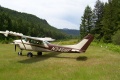
Wren 460 - Ken Foote
Tue Jul 22, 2008 1:01 pm
airprakken wrote: Has anybody used some "C clamp like thing, possibly padded" on the dash brow?
I looked at doing something like that on the 150. It might work but it might also crack the dash. Mine was already cracked a bit so I was worried I'd just make it worse.
- GroundLooper offline
- Posts: 1168
- Joined: Wed Jun 13, 2007 6:52 pm
- Location: Vancouver, WA
BCP Poser.
Life is good. Life is better with wings.
Life is good. Life is better with wings.
Tue Jul 22, 2008 2:09 pm
WrenPilot wrote:On the 206 I used to own I mounted an inexpensive video camera (this was a small fixed focal length camera only (i.e. no storage capability) originally designed to sit on top of a computer) on a bracket which I fabricated & mounted to the wing strut with hose clamps.
That reminds me...I've also thought about just getting one of the 'high def' USB web cameras and using my laptop to record the video. I can't say what the quality would be like.
- chrisg offline
- Airstrip Database Manager
- Posts: 220
- Joined: Tue Jan 01, 2008 9:04 pm
- Location: Coeur d'Alene, Idaho
Chris
http://www.shortfield.com - Backcountry Airstrip Database
https://discord.gg/HNHKeDE - Groundfall - Bush Flying Video Game
http://www.shortfield.com - Backcountry Airstrip Database
https://discord.gg/HNHKeDE - Groundfall - Bush Flying Video Game
Tue Jul 22, 2008 2:50 pm
I also use Velcro on my dash, and plug my intercom into my camera. I use manual on the camera and set it on infinity. I don't have a picture of this setup. I have plenty of videos here if you haven't seen them.
www.youtube.com/skybobb
www.youtube.com/skybobb
1959 Cessna 182 Skylane N9054N
My back country videos are here: http://www.youtube.com/skybobb
"I don't belong to any organized Political party, I'm a Democrat."
Will Rogers 1879 - 1935
My back country videos are here: http://www.youtube.com/skybobb
"I don't belong to any organized Political party, I'm a Democrat."
Will Rogers 1879 - 1935
Tue Jul 22, 2008 3:09 pm
I have been wanting to take good video while flying for a long time. I tried sticking my camcorder to the dash by a variety of methods but always ended up with excess vibration. I went all out and called a company called xtreme recall which makes bullet cams for many high end sporting purposes including the reno air races. They made me a custom setup that I can either mount inside the plane or stick on the outside of my headset for a first person view. Call them and ask for Sargon, he will set you up with a custom built system made for exactly what you are trying to accomplish.
Big fish, Beavers, and Bears!
http://www.alaskarainbowlodge.com
http://www.alaskarainbowlodge.com
Tue Jul 22, 2008 8:20 pm
I use a RAM Mount that I stole from my GPS. I had to buy a ball for it with the standard camera/camcorder thread. I think the ball was about $12 bucks, and the mounts can be found for ~$30. The great thing is it clamps on any cockpit bars, is free of vibration, sturdy, can be articulated, and even handles aerobatics well.
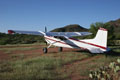
Here's a few pics:

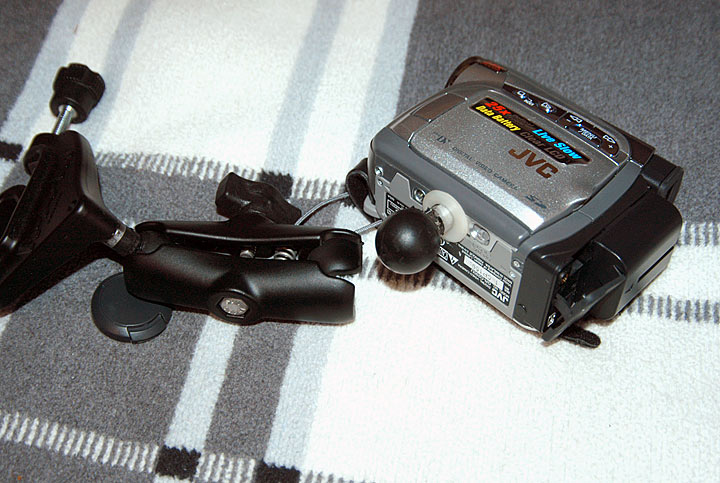
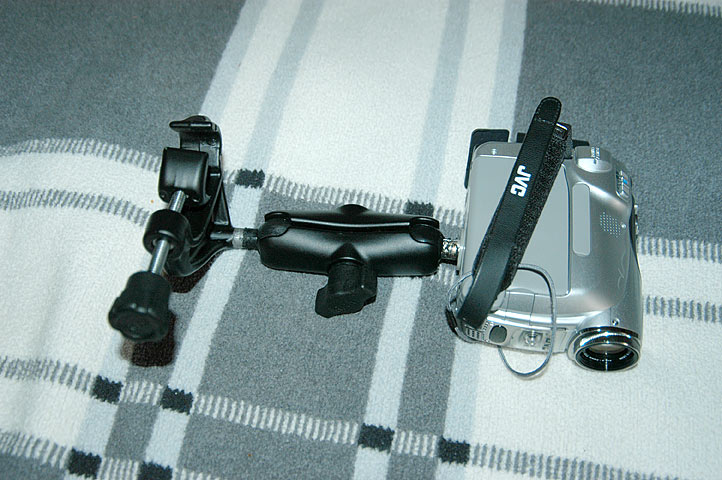
Here's a video with a bit of footage that uses my mount:
<object width="425" height="344"><param name="movie" value="http://www.youtube.com/v/PHzwdJJtIfY&hl=en&fs=1"></param><param name="allowFullScreen" value="true"></param><embed src="http://www.youtube.com/v/PHzwdJJtIfY&hl=en&fs=1" type="application/x-shockwave-flash" allowfullscreen="true" width="425" height="344"></embed></object>
Here's a few pics:
Here's a video with a bit of footage that uses my mount:
<object width="425" height="344"><param name="movie" value="http://www.youtube.com/v/PHzwdJJtIfY&hl=en&fs=1"></param><param name="allowFullScreen" value="true"></param><embed src="http://www.youtube.com/v/PHzwdJJtIfY&hl=en&fs=1" type="application/x-shockwave-flash" allowfullscreen="true" width="425" height="344"></embed></object>
- sticknrudder offline
- Posts: 182
- Joined: Fri Jun 01, 2007 7:39 am
- Location: San Jose
- Aircraft: 7GCBC
C182
J-3
Thu Aug 28, 2008 3:13 pm
use a RAM Mount that I stole from my GPS. I had to buy a ball for it with the standard camera/camcorder thread. I think the ball was about $12 bucks, and the mounts can be found for ~$30. The great thing is it clamps on any cockpit bars, is free of vibration, sturdy, can be articulated, and even handles aerobatics well.
sticknrudder:
I am going to give your mount a try...looks like it will work for me.
HC
sticknrudder:
I am going to give your mount a try...looks like it will work for me.
HC
Thu Aug 28, 2008 6:13 pm
Thu Aug 28, 2008 6:48 pm
Hafast wrote:Sticknrudder..............
Great video.......what are you using to edit everything?
Thanks! I put it together in Adobe Premiere Pro... kinda klunky and slow software.
Chris
- sticknrudder offline
- Posts: 182
- Joined: Fri Jun 01, 2007 7:39 am
- Location: San Jose
- Aircraft: 7GCBC
C182
J-3
Thu Aug 28, 2008 7:32 pm
Sat Aug 30, 2008 9:07 pm
Here's my latest attempt at making a video as good as the rest of you guys..........I'm working on it!
The first part is from an Oregon Scientific digital camera mounted on the pitot tube and it's kinda dark. The second video is from my Sony digital tape camera mounted on the v-brace above the panel.
<object width="400" height="302"> <param name="allowfullscreen" value="true" /> <param name="allowscriptaccess" value="always" /> <param name="movie" value="http://vimeo.com/moogaloop.swf?clip_id=1649104&server=vimeo.com&show_title=1&show_byline=1&show_portrait=1&color=00ADEF&fullscreen=1&group_id=1986" /> <embed src="http://vimeo.com/moogaloop.swf?clip_id=1649104&server=vimeo.com&show_title=1&show_byline=1&show_portrait=1&color=00ADEF&fullscreen=1&group_id=1986" type="application/x-shockwave-flash" allowfullscreen="true" allowscriptaccess="always" width="400" height="302"></embed></object><br /><a href="http://vimeo.com/groups/1986/videos/1649104?pg=embed&sec=1649104">Landing At Redcreek And Payson Arizona</a> from <a href="http://vimeo.com/user656853?pg=embed&sec=1649104">Hafast</a> on <a href="http://vimeo.com?pg=embed&sec=1649104">Vimeo</a>.
The first part is from an Oregon Scientific digital camera mounted on the pitot tube and it's kinda dark. The second video is from my Sony digital tape camera mounted on the v-brace above the panel.
<object width="400" height="302"> <param name="allowfullscreen" value="true" /> <param name="allowscriptaccess" value="always" /> <param name="movie" value="http://vimeo.com/moogaloop.swf?clip_id=1649104&server=vimeo.com&show_title=1&show_byline=1&show_portrait=1&color=00ADEF&fullscreen=1&group_id=1986" /> <embed src="http://vimeo.com/moogaloop.swf?clip_id=1649104&server=vimeo.com&show_title=1&show_byline=1&show_portrait=1&color=00ADEF&fullscreen=1&group_id=1986" type="application/x-shockwave-flash" allowfullscreen="true" allowscriptaccess="always" width="400" height="302"></embed></object><br /><a href="http://vimeo.com/groups/1986/videos/1649104?pg=embed&sec=1649104">Landing At Redcreek And Payson Arizona</a> from <a href="http://vimeo.com/user656853?pg=embed&sec=1649104">Hafast</a> on <a href="http://vimeo.com?pg=embed&sec=1649104">Vimeo</a>.
Last edited by Hafast on Tue Sep 02, 2008 6:43 am, edited 1 time in total.
Sun Aug 31, 2008 5:58 am
To prevent the camera from hunting focus (and as a result getting nice sharp images of bug guts on the windscreen) preset the focus to infinity. Don't forget to clean the windscreen in front of the camera before departure. Preset the zoom to include the cowling in order to provide a frame of reference for the viewer. If your video camera has exposure adjustments it's better to use a slower shutter speed to that the prop doesn't look stopped. A polarizing filter can make the sky 'pop' by making the blue sky darker in comparison to the clouds. It can also reduce reflections from the plex. Wrap the camera and mount with black velvet fabric to further reduce reflections.
Sun Aug 31, 2008 6:54 am
One of the great regrets I have from nearly 40 years of flying in some fantastic places and projects is that I took very few photos, and no videos.
There's really no excuse for this, even forty years ago--I was just lazy. After all, Noel Wien carried a 4X5 camera with him almost everywhere he traveled in the earliest day of Alaska aviation.
I was just lazy, I reckon.
But, with today's technology available, there's even less excuse not to document things from the air, and airmen in action.
Good on you guys for getting it done.
MTV
There's really no excuse for this, even forty years ago--I was just lazy. After all, Noel Wien carried a 4X5 camera with him almost everywhere he traveled in the earliest day of Alaska aviation.
I was just lazy, I reckon.
But, with today's technology available, there's even less excuse not to document things from the air, and airmen in action.
Good on you guys for getting it done.
MTV


DISPLAY OPTIONS
Who is online
Users browsing this forum: No registered users and 0 guests
Latest Features
-
Live to Tell
A Minnesota pilot is surprised to learn that the sudden asymmetric drag of an out-of-rig ski can…Read More -
Creators
Working in some of the Yukon's most beautiful and remote environments, photographer Simon Blakesley captures aircraft in…Read More -
Aircraft Ownership and Maintenance
Upgrading to big tires can make a huge difference in backcountry performance, but with those gains come…Read More -
Tales from Yesteryear
In this tale from bush flying yesteryear, Don Cogger signs up to help Atlee Dodge Jr recovery…Read More


Latest Knowledge Base
-
Destinations
A regional guide with ideas for winter camping destinations in California, Nevada, New Mexico, and Arizona.Read More -
Aircraft
Finding an affordable aircraft that can handle the backcountry for $80K or less? A challenge for sure, but with the…Read More -
Aircraft
01.29.2018 - Zane - Updated tire diameter graphic to add 8.50x10 Guide to tires for use in the backcountry and off-airport landing…Read More -
Pilots
12.22.2013 - Initial article format Operating aircraft on skis and negotiating a snow-covered landscape is an entirely unique skillset and environment.…Read More


