
Testing posting pics
Sat Jul 05, 2008 3:19 pm
- Grassstrippilot offline

- Posts: 3536
- Joined: Wed May 31, 2006 6:17 am
- Location: Syracuse, UT
- FindMeSpot URL: https://share.garmin.com/WolfAdventures
- Aircraft: Cessna 205
Sat Jul 05, 2008 3:56 pm

- Green Hornet offline

- Posts: 527
- Joined: Tue Apr 08, 2008 1:47 pm
- Location: No Where Land, USA
AKA SOJORRN
1997 Maule-M7-235C
I am a leaf on the wind watch how I soar! Hoban "Wash" Washburne, Firefly/Serenity
WOC SPOT
1997 Maule-M7-235C
I am a leaf on the wind watch how I soar! Hoban "Wash" Washburne, Firefly/Serenity
WOC SPOT
Sat Jul 05, 2008 5:32 pm
Hey Sojorrn,
I probably did it the long way, but I uploaded them to the site you gave me, then saved the image to my computer, then saved them to my photo album here on BCP, now I'll put them into a message. Is there a shorter way that I am missing?
Ok, I see where you can select "message board" size. I wasn't sure which to use so I used email/websites. If message size works well, I'll use that one in the future.
Thanks! Now I'll see if I can get them into a message.
I probably did it the long way, but I uploaded them to the site you gave me, then saved the image to my computer, then saved them to my photo album here on BCP, now I'll put them into a message. Is there a shorter way that I am missing?
Ok, I see where you can select "message board" size. I wasn't sure which to use so I used email/websites. If message size works well, I'll use that one in the future.
Thanks! Now I'll see if I can get them into a message.
- Grassstrippilot offline
- Posts: 3536
- Joined: Wed May 31, 2006 6:17 am
- Location: Syracuse, UT
- FindMeSpot URL: https://share.garmin.com/WolfAdventures
- Aircraft: Cessna 205
Sat Jul 05, 2008 7:36 pm
I never saved any to a photo alblum but # 10 the forums box #11 copy all contents by right click. then go to reply box or new topic box and paste the contents of forum box. This will render photo to site.
1. Go to: http://imageshack.us/
2. REGISTER
3. Click on tab My Images
4. Click on UPLOAD IMAGE in action column
5. click on Browse button
6. double click on file of photo
7. select size 640x 480 ( for message boards)
8. Click upload button
9. Click on i button next to picture, i = internet -blue in color
10. Forums: (box) highlight entire contents of box
11. Right Click and scroll to COPY
12. Go to BCP thread click on reply and paste data
13. Preview to see if photo transferred properly especially size.
14. Add message if desired and submit
1. Go to: http://imageshack.us/
2. REGISTER
3. Click on tab My Images
4. Click on UPLOAD IMAGE in action column
5. click on Browse button
6. double click on file of photo
7. select size 640x 480 ( for message boards)
8. Click upload button
9. Click on i button next to picture, i = internet -blue in color
10. Forums: (box) highlight entire contents of box
11. Right Click and scroll to COPY
12. Go to BCP thread click on reply and paste data
13. Preview to see if photo transferred properly especially size.
14. Add message if desired and submit
- Green Hornet offline
- Posts: 527
- Joined: Tue Apr 08, 2008 1:47 pm
- Location: No Where Land, USA
AKA SOJORRN
1997 Maule-M7-235C
I am a leaf on the wind watch how I soar! Hoban "Wash" Washburne, Firefly/Serenity
WOC SPOT
1997 Maule-M7-235C
I am a leaf on the wind watch how I soar! Hoban "Wash" Washburne, Firefly/Serenity
WOC SPOT
Sat Jul 05, 2008 7:58 pm
- Grassstrippilot offline
- Posts: 3536
- Joined: Wed May 31, 2006 6:17 am
- Location: Syracuse, UT
- FindMeSpot URL: https://share.garmin.com/WolfAdventures
- Aircraft: Cessna 205
Sat Jul 05, 2008 8:12 pm

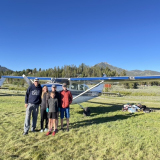
By grassstrippilot, shot with DSC-W55 at 2008-07-05
Oh man, that is a LOT easier than what I was doing! Thanks!!
Wilson Bar 2 weeks ago.
- Grassstrippilot offline
- Posts: 3536
- Joined: Wed May 31, 2006 6:17 am
- Location: Syracuse, UT
- FindMeSpot URL: https://share.garmin.com/WolfAdventures
- Aircraft: Cessna 205
Sat Jul 05, 2008 9:24 pm

- Green Hornet offline
- Posts: 527
- Joined: Tue Apr 08, 2008 1:47 pm
- Location: No Where Land, USA
AKA SOJORRN
1997 Maule-M7-235C
I am a leaf on the wind watch how I soar! Hoban "Wash" Washburne, Firefly/Serenity
WOC SPOT
1997 Maule-M7-235C
I am a leaf on the wind watch how I soar! Hoban "Wash" Washburne, Firefly/Serenity
WOC SPOT
Sun Jul 06, 2008 8:15 am
Ya'll don't have to use another server to host pix unless you need it for ?
Zane has a good tutorial here for uploading pix and another here for how to place the image in a post.
The way you guys are doing it is fine except that we can't click your gallery under your screen name / avatar and see your albums. Kinda' nice to be able to associate the pix with the pilot and browse 'em all from BCP.
Mark
Zane has a good tutorial here for uploading pix and another here for how to place the image in a post.
The way you guys are doing it is fine except that we can't click your gallery under your screen name / avatar and see your albums. Kinda' nice to be able to associate the pix with the pilot and browse 'em all from BCP.
Mark
- retired user offline
- Posts: 710
- Joined: Sat Oct 01, 2005 7:07 am
Sun Jul 06, 2008 10:26 am
I tried and failed to actually upload twice. I am sure it is pilot error but the instructions could be simplified. Do you need to compress the photo's before uploading?
- Green Hornet offline
- Posts: 527
- Joined: Tue Apr 08, 2008 1:47 pm
- Location: No Where Land, USA
AKA SOJORRN
1997 Maule-M7-235C
I am a leaf on the wind watch how I soar! Hoban "Wash" Washburne, Firefly/Serenity
WOC SPOT
1997 Maule-M7-235C
I am a leaf on the wind watch how I soar! Hoban "Wash" Washburne, Firefly/Serenity
WOC SPOT
Sun Jul 06, 2008 10:38 am
Sojorrn wrote:I tried and failed to actually upload twice. I am sure it is pilot error but the instructions could be simplified. Do you need to compress the photo's before uploading?
Yes, the gallery will barf if they aren't less than 1MB in size and less than 2100 pixels in either dimension. That's easy to achieve if you save them to JPG with 75% compression. Personally, I keep all my original photos in their large, uncompressed state, and selectively export or resize them to about 1280x1024 and 75% compression for upload to internet galleries. It's more efficient and allows me to prove ownership of the photo, as no one but me can have the full high-res original.
- Zzz offline


- Posts: 2855
- Joined: Fri Oct 08, 2004 11:09 pm
- Location: northern
- Aircraft: Swiveling desk chair
Half a century spent proving “it is better to be thought a fool than to open your mouth and remove all doubt.”
Sun Jul 06, 2008 12:13 pm
- Green Hornet offline
- Posts: 527
- Joined: Tue Apr 08, 2008 1:47 pm
- Location: No Where Land, USA
AKA SOJORRN
1997 Maule-M7-235C
I am a leaf on the wind watch how I soar! Hoban "Wash" Washburne, Firefly/Serenity
WOC SPOT
1997 Maule-M7-235C
I am a leaf on the wind watch how I soar! Hoban "Wash" Washburne, Firefly/Serenity
WOC SPOT
DISPLAY OPTIONS
Who is online
Users browsing this forum: No registered users and 6 guests
Latest Features
-
Live to Tell
A Minnesota pilot is surprised to learn that the sudden asymmetric drag of an out-of-rig ski can…Read More -
Creators
Working in some of the Yukon's most beautiful and remote environments, photographer Simon Blakesley captures aircraft in…Read More -
Aircraft Ownership and Maintenance
Upgrading to big tires can make a huge difference in backcountry performance, but with those gains come…Read More -
Tales from Yesteryear
In this tale from bush flying yesteryear, Don Cogger signs up to help Atlee Dodge Jr recovery…Read More


Latest Knowledge Base
-
Destinations
A regional guide with ideas for winter camping destinations in California, Nevada, New Mexico, and Arizona.Read More -
Aircraft
Finding an affordable aircraft that can handle the backcountry for $80K or less? A challenge for sure, but with the…Read More -
Aircraft
01.29.2018 - Zane - Updated tire diameter graphic to add 8.50x10 Guide to tires for use in the backcountry and off-airport landing…Read More -
Pilots
12.22.2013 - Initial article format Operating aircraft on skis and negotiating a snow-covered landscape is an entirely unique skillset and environment.…Read More


