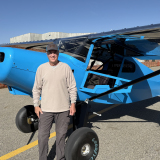
I’ve never posted in this forum before, even though I like the articles and advice found here. By way of background, I am a retired USAF C-130 pilot and currently fly a Glasair Sportsman primarily in Idaho, Washington, Oregon, and Utah. For the last few years I’ve been working on modelling General Aviation aircraft performance, at first using a massive spreadsheet. This took a more time-consuming turn about a year ago when I decided to migrate that work into a custom iOS app for the iPhone to do real-time aircraft performance calculations. I named the app “TLAR” which stands for “That Looks About Right,” a term I’m sure many of you know.
TLAR is an iOS app that computes aircraft performance information in real time for several types of single-engine piston-powered General Aviation aircraft. TLAR computes takeoff, climb, cruise, and landing performance adjusted for weather and atmospheric conditions such as winds and density altitude and surface conditions such as runway slope and surface type and displays that information both textually and graphically. TLAR can operate with or without a network connection.
Apple Computer recently approved TLAR for public BETA release. This forum seems a good place to find aviators who care about aircraft performance and willing to be BETA-testers of TLAR. With Zzz’s permission as the site founder, I’m making TLAR BETA available to as many as 500 members of this forum (first come first served).
The app is complex, as is aerodynamics, but with certain settings TLAR requires little to no pilot interaction in flight (download the 121-page pilot guide available at http://www.tlarpilot.com.). The BETA version is free, but it is copyrighted and has applicable terms of service (the commercial version, if it gets that far, will not be free). Apple forces BETA apps to “self-destruct” after a maximum of 90 days (sometimes less).
- PLAN.png (156.1 KiB) Viewed 3088 times
- FLY basic.png (298.63 KiB) Viewed 3088 times
At present, the app covers the following aircraft (in varying levels of accuracy):
• Bonanza A36
• Cessna 152
• Cessna 172M
• Cessna 172N
• Cessna 180K
• Cessna 182P
• Cirrus SR20
• Cirrus SR22
• Cirrus SR22T
• Cub Crafters FX-2
• Cub Crafters FX-3
• Glasair Sportsman
• Glastar Glastar
• Harmon Rocket II
• Kitfox 7 Series SS
• Kitfox 7 Series STI
• Mooney M20F Turbo
• Piper J3
• Piper PA18
• Piper PA28-140
• Piper PA28-181
• Vans RV-8
Sorry if your model is not yet covered. More planes will be added over time. For now, if your plane is not on the list, you can pick a similar one and adjust the horsepower to approximate your own (see pilot guide for instructions).
INSTALLATION
iOS device must be running iOS 14.3 or higher and meet the following hardware requirements:
• GPS
• Accelerometer
• Magnetometer
• Gyroscope
• Location Services
• ARM64 architecture
• Minimum performance of A12 chip
Translated to exact device models, TLAR will only install and run on the following:
• iPhone: Xs, Xs Max, Xr, 11, 11 Pro, 11 Pro Max, SE (2nd gen)*, 12 Pro Max, 12 Pro, 12, 12 mini, 13 Pro Max, 13 Pro, 13, 13 mini.
*Note for iPhone SE (2nd gen) models- All of TLAR’s core functionality remains, but a few features are not available on account of the iPhone SE’s small screen.
• iPad**: Must be a built-in cellular and GPS version of one of the following models: iPad Pro 12.9” (3rd, 4th, 5th gen), iPad Pro 11” (1st, 2d, 3rd Gen), iPad Mini (5th and 6th gen), iPad Air (3rd, 4th gen), iPad (8th and 9th gen)
** TLAR is designed for iPhones and not optimized for iPad. It looks a bit awkward on (especially the larger) iPads
If your device is not listed, TLAR will not install on your device. For more on hardware requirements, see: https://developer.apple.com/support/req ... abilities/
To install TLAR BETA on any of the devices listed above, first download Apple’s “TestFlight” app from Apple’s app store (its Free). It’s the one that looks like the attached file (blue icon with 3-bladed prop).
- testflight icon.png (15.32 KiB) Viewed 3088 times
It will ask you to agree to the terms of being a BETA tester first. Once you have “TestFlight” on your device, it will likely present you a screen asking for a redemption code (see other attached file).
- redeem.jpg (25.33 KiB) Viewed 3088 times
Do not worry about that code, it’s used to distribute BETA versions via targeted e-mail invites, not for public links which is what is posted next. Disregard the code, and exit “TestFlight.”
Next, navigate this link and follow the directions:
https://testflight.apple.com/join/kEoRKsuK
Please send feedback on what’s good/bad/ugly about TLAR and any suggestions you have to make it better. Send an email to [email protected] or through Apple’s “TestFlight” app. If TLAR crashes and your device prompts you if you want to send crash info to Apple, please do…it will come to me with embedded information (like the line number of code that crashed) to allow me to ID/fix the problem.
Here are the primary known issues in TLAR v 1.0 (build 5):
• FAA database incomplete (not all States loaded, not all public airports available) and has errors (most common is a runway axis error)
• Display is scrambled if user has “display zoom” set to “zoomed” in their iPhone’s “Display and Brightness” settings
• Display poor on iPad
Enjoy and thanks for helping test this app, looking forward to your feedback!
Jeff
Boise, Idaho