Backcountry Pilot • Optimizing an image for your Profile Cover

Optimizing an image for your Profile Cover

Look in here for step-by-step procedures on how to upload photos to the gallery, embed images in posts, and use other fun features of this website.
8 postsPage 1 of 1

Optimizing an image for your Profile Cover

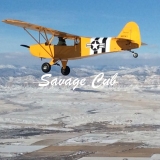
The software we use is sort of modeled after other popular social media sites, and as such you get to upload a "profile cover," or a large image that you think defines you and looks cool. This is mine, an image I shot with my phone early in the morning departing for Idaho a few years ago:

Image

As many of you have noticed, the current version of the software doesn't allow you to reposition the photo you upload, so if you upload an image that is more like what comes out of your camera (3:2 aspect ratio), it will only show the upper portion and usually looks bad. As I scroll through my Community feed I see many images uploaded one after another, and I assume it's because you guys are looking for an image that looks good as a profile cover. I'm hoping the latest version will allow you to reposition after uploading so this step becomes unnecessary, but until I upgrade, the solution is to crop before uploading.

1. Crop your image as a wide rectangle (1194x478) before uploading. Use a tool like Fotor.com
2. Go you ME > My Profile
3. Hover over the profile cover image and click Change Cover.
4. Upload your pre-cropped file.
5. Hope for the best

The dimensions it will display at in the its widest mode are 1194x478. Many image editing applications will let you specify a ratio for the crop tool, so if you type in 1194 wide and 478 high, you can then scale the crop rectangle and maintain the aspect ratio. Sometimes you need to check a "Keep/maintain proportions" checkbox. If you do this on a high resolution image straight out of your camera, crop first using that ratio, then resize the cropped version down to 1194x478.

I found this cool website that has some easy tools that will allow you to edit your image without needing any software installed. I tested it out with a high res image and it allowed me to select a pic from my computer, crop, resize, and save back to my computer. Pretty slick.

Let me know if you have any questions.
Zzz offline
Janitorial Staff
User avatar
Posts: 2854
Joined: Fri Oct 08, 2004 11:09 pm
Location: northern
Aircraft: Swiveling desk chair
Half a century spent proving “it is better to be thought a fool than to open your mouth and remove all doubt.”

Re: Optimizing an image for your Profile Cover

Followed your step by step instructions and used the "cool website" link.
Easy peasy.
Thanks.
S-12Flyer offline
User avatar
Posts: 534
Joined: Wed Jan 12, 2011 11:11 am
Location: Grand Junction, CO
"In a world full of people, only a few want to fly"

Re: Optimizing an image for your Profile Cover

S-12Flyer wrote:Followed your step by step instructions and used the "cool website" link.
Easy peasy.
Thanks.


Looks good!

Image
Zzz offline
Janitorial Staff
User avatar
Posts: 2854
Joined: Fri Oct 08, 2004 11:09 pm
Location: northern
Aircraft: Swiveling desk chair
Half a century spent proving “it is better to be thought a fool than to open your mouth and remove all doubt.”

Re: Optimizing an image for your Profile Cover

Is there a way to do this from an ipad?
Jeredp offline
KB and Supporter
User avatar
Posts: 625
Joined: Fri Apr 20, 2012 10:31 am
Location: WA
FindMeSpot URL: http://share.findmespot.com/shared/face ... 7NYN40QT2I
Aircraft: Cessna 172

Re: Optimizing an image for your Profile Cover

Jeredp wrote:Is there a way to do this from an ipad?


Jeredp,

If the photo is already on your iPad, go to your photos and open the photo you want to crop. In the upper right hand corner, touch the "Edit" button. Now you will see several editing buttons on the bottom. Touch the "Crop" button. This puts a grid overlay on your picture, with touch/drag corners.

If the subject you want is near the center of the picture already, just "squish" (technical term) the corners down some, keeping the full width of the picture. If you want the subject offset, or you need to adjust the crop to center the subject, just play with the crop corners until it "looks about right."

When you get what you were looking for, touch the "Save" button in the upper right corner where the "Edit" button used to be, then save to your camera roll. Now the cropped picture is ready to be uploaded to BCP and revealed to the world in all of its glory! :D
CapnMike offline
Supporter
User avatar
Posts: 842
Joined: Wed Mar 05, 2014 11:25 am
Location: Kamas, Utah and Sandpoint, Idaho
"If my wings should fail me Lord, please meet me with another pair" - Led Zeppelin
"It's all going in my report..." - CapnMike

Re: Optimizing an image for your Profile Cover

Bumping this because I've seen a lot of profile covers in my community feed that are 3:2 instead of the 11:4 or whatever it is that works best. See above. 8)
Zzz offline
Janitorial Staff
User avatar
Posts: 2854
Joined: Fri Oct 08, 2004 11:09 pm
Location: northern
Aircraft: Swiveling desk chair
Half a century spent proving “it is better to be thought a fool than to open your mouth and remove all doubt.”

Re: Optimizing an image for your Profile Cover

Bump... seeing more multiple uploads of images in the feed. Hoping to have this fixed before long so it works more like Facebook, but for now this is the solution.
Zzz offline
Janitorial Staff
User avatar
Posts: 2854
Joined: Fri Oct 08, 2004 11:09 pm
Location: northern
Aircraft: Swiveling desk chair
Half a century spent proving “it is better to be thought a fool than to open your mouth and remove all doubt.”

Re: Optimizing an image for your Profile Cover

OK, I went to fotor.com and gave it a try. Well the photo i want to use can't go to 1194 wide
but can go to 478 high. The photo is 960 x 720.

Any way to make it work? I'm not the most tech savy 19 y/o out their (in case you couldn't tell).

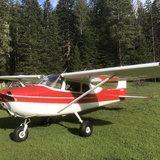
This is the photo.
Image
ExperimentalAviator offline
User avatar
Posts: 677
Joined: Tue Apr 15, 2014 8:02 am
Location: Plains

DISPLAY OPTIONS

8 postsPage 1 of 1

Who is online

Users browsing this forum: No registered users and 0 guests

Latest Features

Latest Knowledge Base